Using SOLIDWORKS PDM Professional and Visiativ PLM Together
14 January 2026
What do you do when SOLIDWORKS PDM Professional can’t take you to the next level of your document or process management strategy? Product Data Management (PDM) does a great job of managing files and solving problems when you’ve implemented it, but now you’ve realised that Product Lifecycle Management (PLM) systems, like Visiativ PLM, can take you to another level of connection between engineering and the rest of the enterprise, with:
- Advanced BOM management – Engineering and Manufacturing BOM
- Integrated project management tools
- Sophisticated ECR/ECO/ECN processes
- Managed access to neutral files for manufacturing, purchasing and suppliers
- Easier governance of data – enables companies to support sharing of information
Visiativ PLM also offers the benefits of item-based management, where items act as containers that hold the part number, description, revision, lifecycle state and more, and can be linked to multiple documents that define the part. Item-based workflows focus on the item itself, with lifecycle states applied at item level and, where required, also affecting associated files, while file and item states remain separate. Change orders can take place on items, files or both, making it easier to manage revisions and approvals. This approach also enables clearer end-to-end traceability, as all related documents, processes and metadata remain linked to the part number.
So, you want all that good stuff, but you also have years’ worth of IP in your PDM database and CAD users who have grown to love the integration between SOLIDWORKS and PDM.
The Solution
Do you have to migrate all the data in your PDM vault to the PLM database and train you CAD users on a new interface? Well, we can help you do that if you want, but there is another way. We can utilise a nifty SOLIDWORKS Partner Product called ‘Visiativ PDM Gateway’. In addition to making data available to most ERP systems, PDM Gateway can also be configured to pass data in either direction between PDM and Visiativ PLM.
Let me explain how the link works, before I give you a quick demo.
What it does
Visiativ PDM Gateway provides is a bidirectional link between SOLIDWORKS PDM and other systems. In our example the other system is Visiativ PLM.

The information shared to PLM can be metadata from the PDM data cards, BOMs or neutral files generated by PDM. That information can trigger the creation or update of items in PLM. Information generated and managed by the PLM system, such as supplier details, costs or ECN numbers can be used to update data held in PDM.
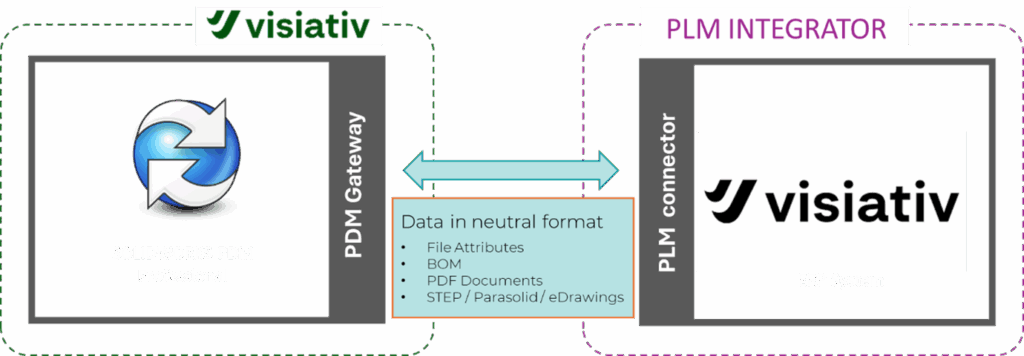
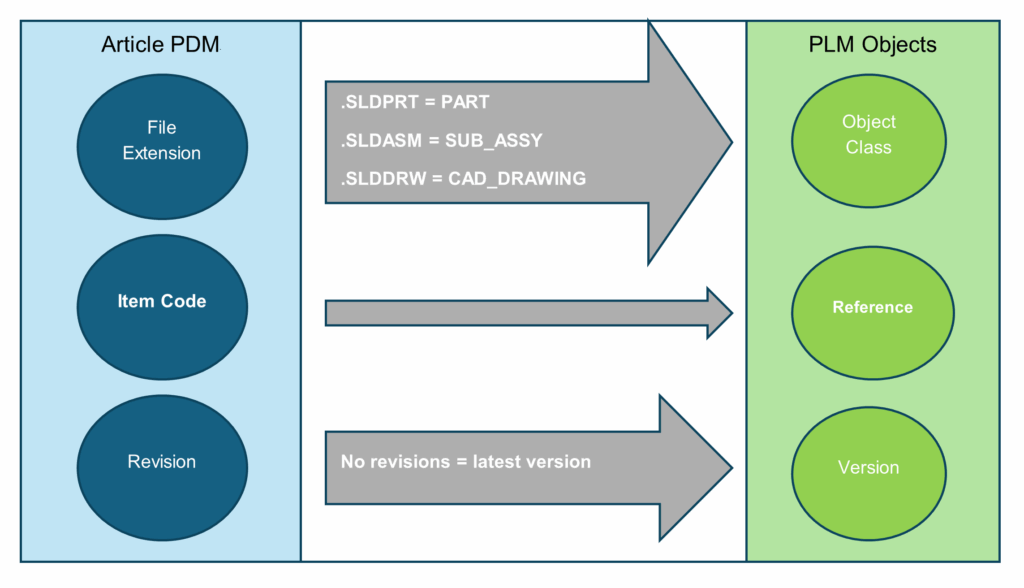
Where PDM mainly handles files, PLM will create CAD objects based on the references found in the configurations
How is the integration controlled?
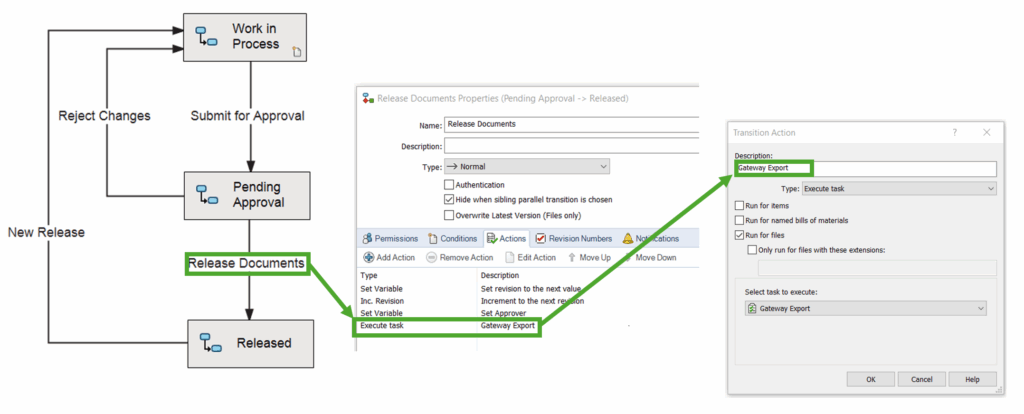
We can configure for manual ‘ad hoc’ actions, but generally using PDM’s workflow functionality is the way to go. PDM Gateway is delivered as a SOLIDWORKS PDM add-in and then configured as a task that can be triggered during a PDM workflow transition, for example when a file is approved for release.
What does that enable?
As described at the start of this guide, Visiativ PLM can take you to another level of connection between engineering and the rest of the enterprise. You can have a read of our other blogs for a deeper dive into the benefits that PLM can bring:
- What is PLM software?
- Boost Efficiency with EDM
- Improve your R&D process efficiency with PLM
- How PLM can Help Mechanical Designers
- Engineering Change Management and PLM
- How PLM can Help Manage Your BOM
- Project Management Tools in a PLM Environment
Demo
The video below shows the PDM to PLM link in action.
How Can Visiativ Help?
I hope you’ve found this guide helpful. Take the next step and contact Visiativ UK and Ireland about Visiativ PLM using the form below or call 01223 200690, to take a deeper dive into the solutions we have available.
|
|
About the author: This product guide was written by Product Lifecycle Management Consultant, Dave Harrowell. Dave has been implementing PLM and PDM systems since 1998. |
|||
|
|
View Dave Harrowell’s LinkedIn Profile here.
|
|||