
SOLIDWORKS PDM with Visiativ PLM - BOM Management (Part 1)
31 July 2026
If you’ve read our previous guides, you’ll know that Visiativ PLM is a great tool for BOM management and also that an existing investment in PDM can be a valuable foundation to realise the benefits of PLM. Those benefits include:
- Enhanced Collaboration with centralised access to product data across teams
- Improved Configuration Control utilising xBOM Management
- Streamlined Change Management thanks to efficient handling of ECRs and ECOs
- Accelerated Development Cycles leading to faster time-to-market and increased agility
n.b. See the links at the end of this guide if you’d like a more detailed recap on the above.
PDM BOM to PLM xBOM
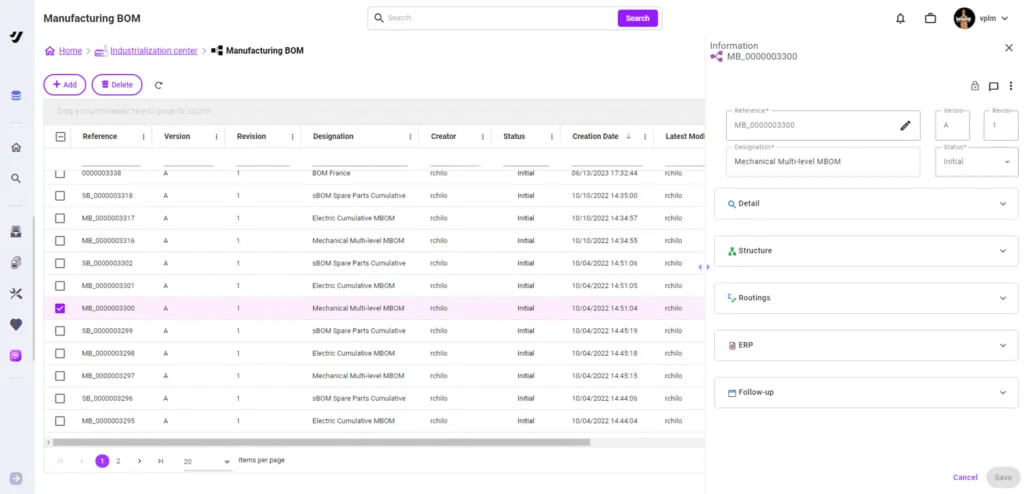
In our previous exploration, we automated importing a CAD BOM from SOLIDWORKS PDM into Visiativ PLM and added a few items to show how to convert it into an Engineering BOM (eBOM). Next we’ll give you an introduction to the process of creating xBOMs from that data.
You may be familiar with the principle of xBOMs. However, this approach allows users to manage different views of the product structure tailored for different purposes. These may be manufacturing BOMs, service BOMs, purchasing BOMs, or others. Each of these BOMs represent how the parts within the product relate to each other from the point of view of the tasks to be carried out by different functions within the business.
In each of these cases there must be one source of truth that links and manages the BOMs and controls their update throughout the product life cycle. This is where Product Lifecycle Management (PLM) is invaluable. In this series of guides we’ll guide you through the process in SOLIDWORKS PDM and Visiativ PLM.
The video below recaps how releasing an assembly in PDM creates a corresponding Engineering BOM (eBOM) in Visiativ PLM, to which you can add non‑CAD items to complete the eBOM.
The second video shows how you can easily create an associated manufacturing BOM from the eBOM, and how PLM attributes and associations can automatically generate a linked spare-part BOM.
And there you have it! We hope this guide has helped explain how SOLIDWORKS PDM works with Visiativ PLM to handle BOM management.
Ready to Find Out More?
We’ve explored similar topics on SOLIDWORKS PDM, Visiativ PLM and bills of materials in the following guides:
- SOLIDWORKS PDM Professional and Visiativ PLM together
- How PLM can help manage your bills of materials
- Visiativ PLM guides
If you would like to learn more about Visiativ PLM and how it can help you, please contact our team using the form below.
 |
About the author: This product guide was written by Product Lifecycle Management Consultant, Dave Harrowell. Dave has been implementing PLM and PDM systems since 1998. |
|||
|
|
||||