
SOLIDWORKS Blue Tokens Explained
03 November 2026
SOLIDWORKS Blue Tokens measure the use of metered AI skills. They’re consumed when a Virtual Companion completes a skill and returns a result, with usage varying according to the task.
If you’re exploring SOLIDWORKS AI, understanding your token balance will help you decide which tasks to try and how to plan wider use.
How do SOLIDWORKS Blue Tokens work?
Opening a companion doesn’t consume tokens. A delivered answer or engineering output can.
The important distinction is between interacting with the interface and receiving a result from a metered skill. Guidance can use tokens too.
Token consumption varies with the complexity and value of the outcome. SOLIDWORKS groups skills into three levels:
| Skill level | Example | Token use |
|---|---|---|
| Simple | Guidance or quick insights | Lower |
| Moderate | Assembly performance analysis or converting an imported part into a parametric model | Moderate |
| Complex | Full drawing generation or detailed part generation | Higher |
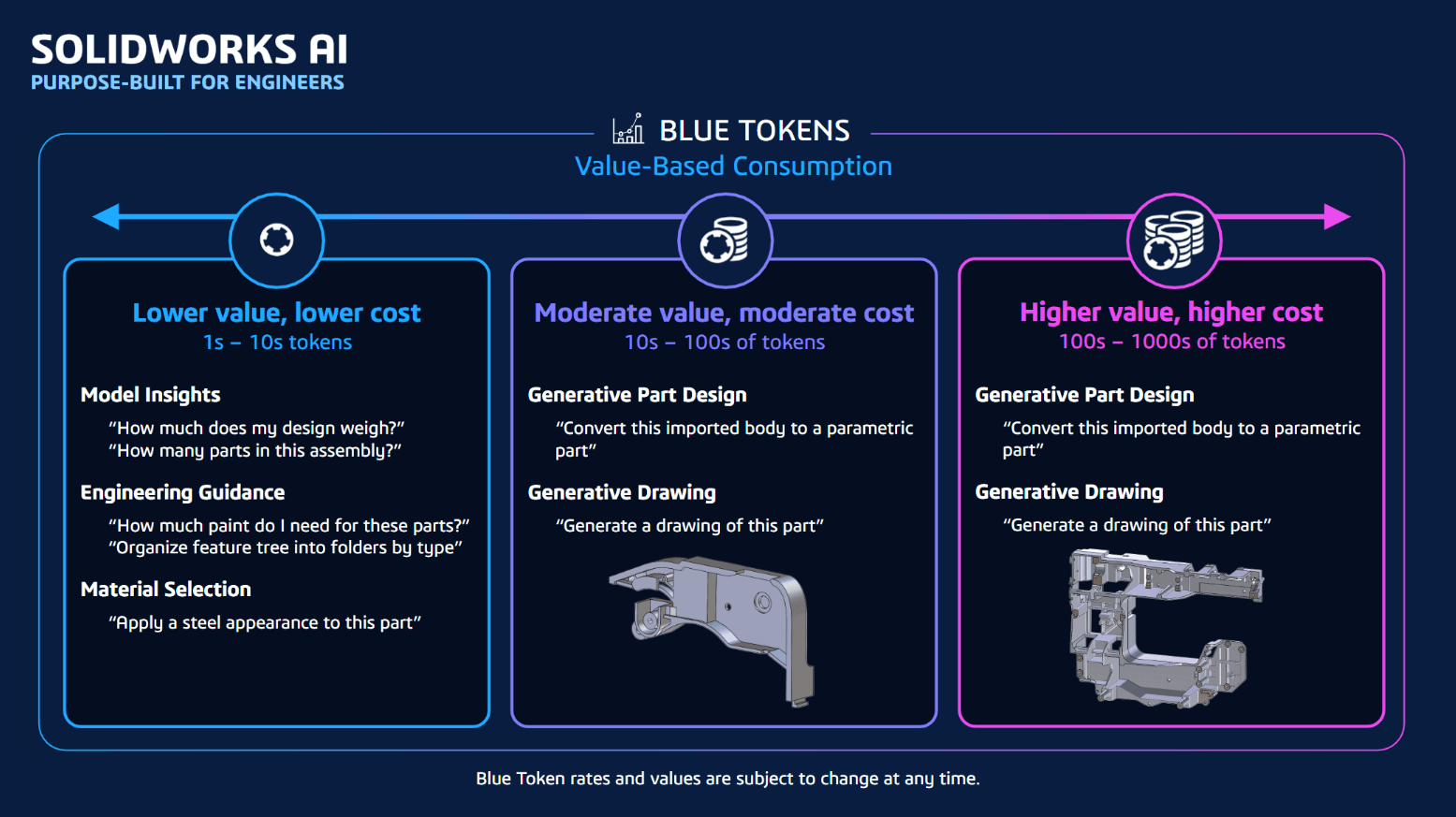
Read the official SOLIDWORKS Blue Token guidance for more information about consumption.
How many free Blue Tokens do you get?
The introductory allocation combines 2,000 tokens for a qualifying SOLIDWORKS Design or SOLIDWORKS Design with Cloud Services licence, plus 100 for 3DSwymer, giving 2,100 Blue Tokens for the qualifying combination.
This is a one-off allocation. It doesn’t refresh each month or year.
Dassault Systèmes sets out this breakdown in its R2026x FD04 update.
Are Blue Tokens shared across your team?
Yes. Tokens are pooled within your organisation’s 3DEXPERIENCE tenant, meaning its platform environment. They aren’t separate personal allowances.
For example, five qualifying licence combinations contributing 2,100 tokens each would add 10,500 tokens to the shared balance. How long that balance lasts depends on the tasks your team performs.
Before experimenting, agree who’ll monitor the balance and which workflows the team wants to evaluate.
How do you get additional Blue Tokens?
Additional packs contain 25,000 Blue Tokens. You can purchase them online or through a SOLIDWORKS reseller.
Purchased packs expire after 12 months and automatically renew at the end of the subscription period. Confirm the renewal terms when ordering.
Which SOLIDWORKS licences are eligible?
The official SOLIDWORKS eligibility FAQ lists:
- SOLIDWORKS Design
- SOLIDWORKS Design with Cloud Services
- SOLIDWORKS xDesign
Academia, Makers and Student tenants are excluded from the initial rollout.
If you’re considering SOLIDWORKS for your business, ask about your intended licence and AI setup together.
How do you check your Blue Token balance?
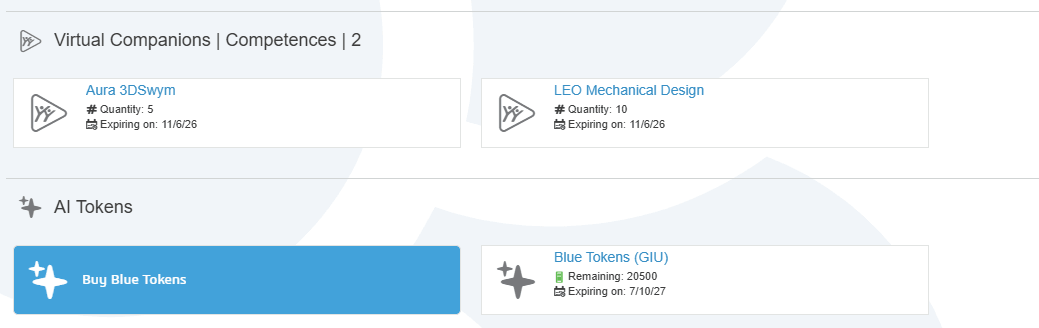
Your platform administrator can view remaining tokens and licence availability in the Members Control Center on the 3DEXPERIENCE platform.

Ask them to check the balance before purchasing more tokens and after your team tests a workflow. For consumption questions, start with your administrator; for purchasing or account enquiries, contact your SOLIDWORKS reseller.
Getting started with AURA and LEO
AURA helps users find relevant knowledge, while LEO supports design activities and workflows.
Our guide to getting started with SOLIDWORKS AI Virtual Companions covers the required roles, installation and connection steps. It recommends SOLIDWORKS 2026 SP3.2 or later for accessing the companions in SOLIDWORKS Design.
Many companion capabilities can work with locally stored design data. Saving data to the platform unlocks additional skills.
For a broader introduction, read SOLIDWORKS AI explained or meet the SOLIDWORKS AI Companions.
Ask Visiativ about SOLIDWORKS Blue Tokens
Want help checking your setup or buying additional tokens? Contact Visiativ UK & Ireland to discuss your SOLIDWORKS licence and requirements.
Email sales@visiativ.co.uk or call 01223 200690.
SOLIDWORKS Blue Tokens FAQs
Is access to SOLIDWORKS AI included with my licence?
Eligible commercial SOLIDWORKS Design and Design with Cloud Services customers can access AURA and LEO without a separate Virtual Companion licence. Metered usage consumes tokens, so included access doesn’t mean unlimited AI use. See the official AI access guidance.
How long will my Blue Tokens last?
There’s no single duration for every team. A useful trial is to record the balance before and after a representative task, note the time saved, then repeat with other tasks you regularly perform. Use those observations to estimate your team’s needs.
Do I need to move all my CAD files to the cloud?
No. Connecting to cloud services and relocating all your CAD files are different decisions. SOLIDWORKS supports AI workflows using locally stored data, although individual skills can have additional requirements. The SOLIDWORKS Cloud Services and AI guide explains the approach.
How should we decide whether to buy more tokens?
Start with a small set of repeatable tasks. Compare the engineering time saved with the token consumption and the effort needed to check the output. Engineers remain responsible for validating designs and making decisions.
 |
About the author: This guide was written by 3DEXPERIENCE Product Manager, Lucy Bryan. Lucy is an Elite SOLIDWORKS Applications Engineer and has been with the Visiativ Technical Support Team since 2019. |
|||
|
|
||||