
How to: Share a 3DEXPERIENCE Dashboard
21 August 2025
In this tutorial we provide an overview of how you can share your 3DEXPERIENCE Visiativ Solutions – SOLIDWORKS dashboard with other users if you have multiple licences. This process is a Visiativ Value Added subscription benefit that will give you and your team easier and quicker access to SOLIDWORKS download media.
Note: to add another user to the system, you must have at least one available 3DSwymmer (IFW) licence.
Not sure which licence type you have or need a hand with your dashboard? Contact our support on support@visiativ.co.uk.
Once you yourself have added the Visiativ Solutions – SOLIDWORKS dashboard to your 3DEXPERIENCE and added the other users to your tenant, you’ll be able to share the dashboard with them.
This will give them easy access to SOLIDWORKS serial numbers, download media and support information provided by Visiativ.
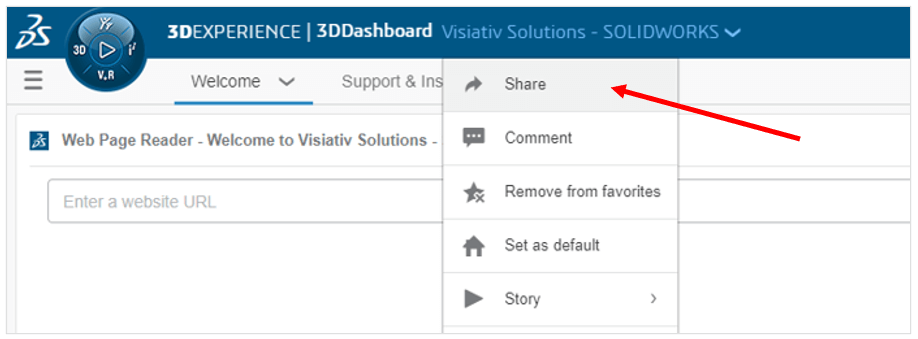
1. With the dashboard active, hit Share.
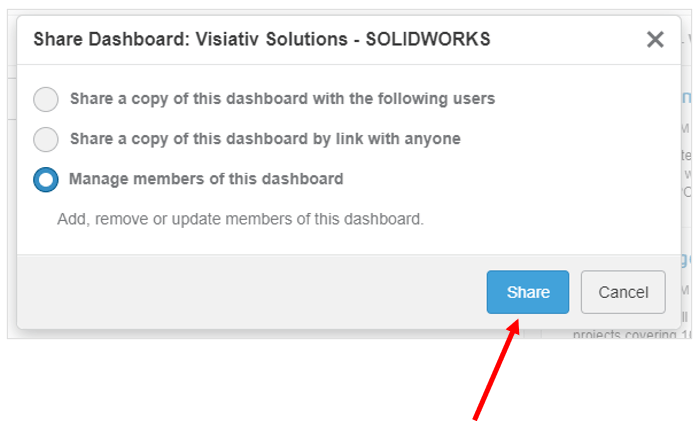
2. Choose to Manage Members.
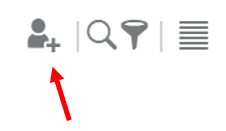
3. Add members.
 |
4. Add the other users into the system by typing their usernames. Then hit Add.
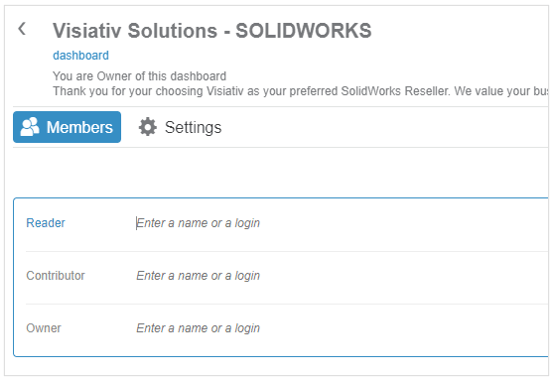
Assign users to the following roles:
- Reader: can only view the dashboard content, not interact with it.
- Contributor: can interact with the app and dashboard content but not edit the layout.
- Owner: can interact with the content and change the dashboard layout.
5. The other users can then access the Visiativ Solutions – SOLIDWORKS from their dashboard list and utilise the useful content.
 |
About the author: This guide was written by 3DEXPERIENCE Product Manager, Lucy Bryan. Lucy is an Elite SOLIDWORKS Applications Engineer and has been with the Visiativ Technical Support Team since 2019. |
|||
|
|
||||