
Cloud Services Implementation Path for SOLIDWORKS Users
14 April 2025
Cloud Services is included with every SOLIDWORKS subscription. It gives you the capability to connect to the cloud to store, manage and share your SOLIDWORKS CAD data easier than ever before.
Here’s what a Cloud Services Implementation could look like for you.
What is the 3DEXPERIENCE Platform?
At its core, the 3DEXPERIENCE Platform is a cloud-connected collaborative environment, where all teams and job roles can be unified in one system, with one interface. 3DEXPERIENCE brings together often disparate aspects of product development and innovation, including design, simulation, manufacturing, and data management.
Traditionally, users would stay in their own product stream – SOLIDWORKS users would usually use SOLIDWORKS products and not much else. However, the Dassault Systèmes portfolio is a vast range of brands and products. Instead of creating cross links between all products and domains to make them accessible by everyone, they’ve created a unified, central location: the 3DEXPERIENCE Platform.
No matter the domain or area of your work, the 3DEXPERIENCE Works portfolio combines the ease-of-use of SOLIDWORKS with best-of-breed applications connected to 3DEXPERIENCE.
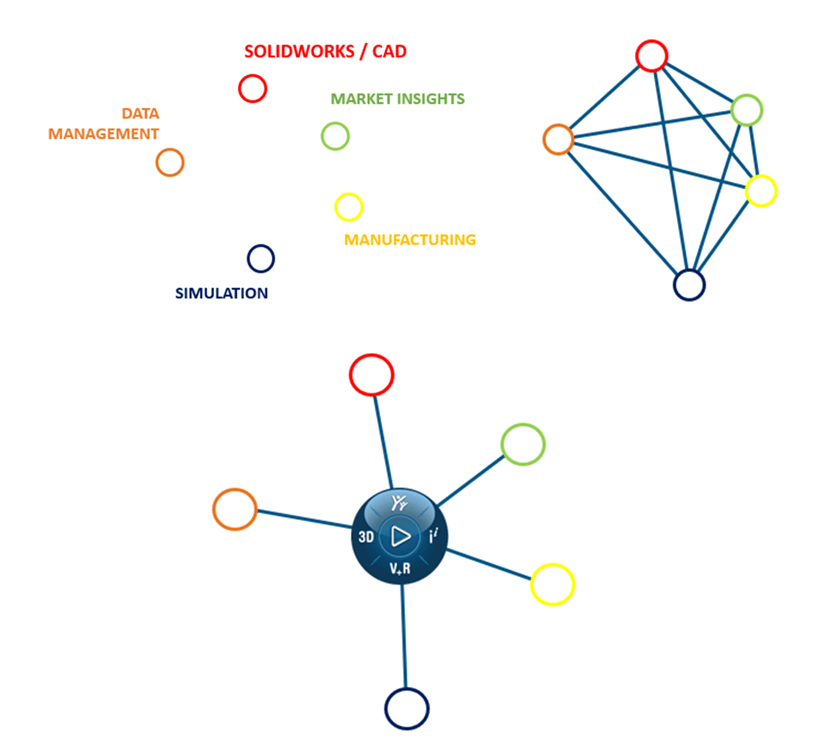
3DEXPERIENCE Cloud Services for SOLIDWORKS – Key Benefits
- All project data can be stored and managed securely in the cloud, giving you the ability to share this with anyone as it can be easily accessible from anywhere and from any device.
- Central cloud storage location for all of your data. It’s stored together in one location and managed in the same way, despite its native CAD format. Useful for SOLIDWORKS users with multiple legacy CAD systems.
- Can be used as an out of the box solution with no additional setup or customised to specific requirements.
- Engineers and designers can create and share designs quickly and easily, allowing key stakeholders to give feedback throughout the product development phase.
- Projects can be planned, developed in SOLIDWORKS and released seamlessly with the lifecycle solutions on 3DEXPERIENCE. Helping you to improve productivity, collaboration and innovation.
3DEXPERIENCE – Key Benefits
- It’s secure and always available – on any device with an internet connection, at any time. Even when away from the office. No need for network connections/VPNs when offsite or dealing with external users.
- No IT management – no need for servers or managed updates.
- Easy to deploy – so fast to implement.
- Secure and always up to date. Automatic and frequent updates mean no ongoing upgrade costs.
- A scalable option, future-proofing your systems and investment.
So the solution sounds great, and it ticks all of your requirements. But how do you take advantage of the tools that are already available to you?
3DEXPERIENCE Cloud Services for SOLIDWORKS – Implementation Path
As 3DEXPERIENCE is a scalable solution, you can customise each step of the process. Start today with Share and Markup, or jump straight into Store and Revise. Before seamlessly adding more capabilities to meet your expanding data management needs.
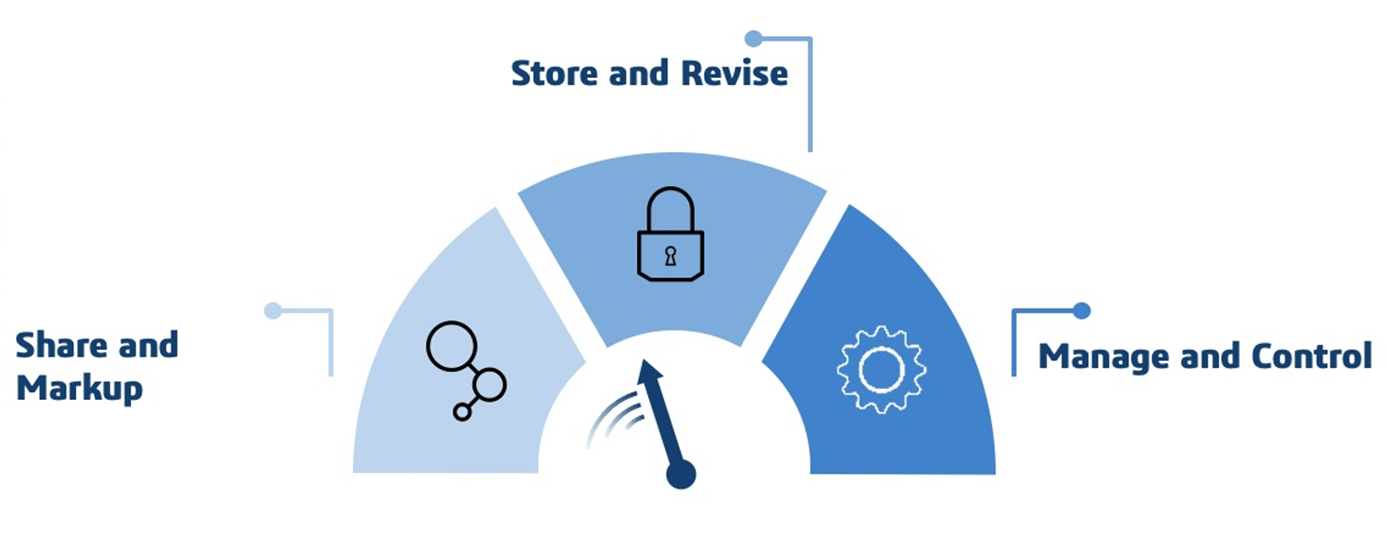
Visiativ offers a number of staged implementation options to help you utilise the 3DEXPERIENCE tools included with your SOLIDWORKS license and Cloud Services.
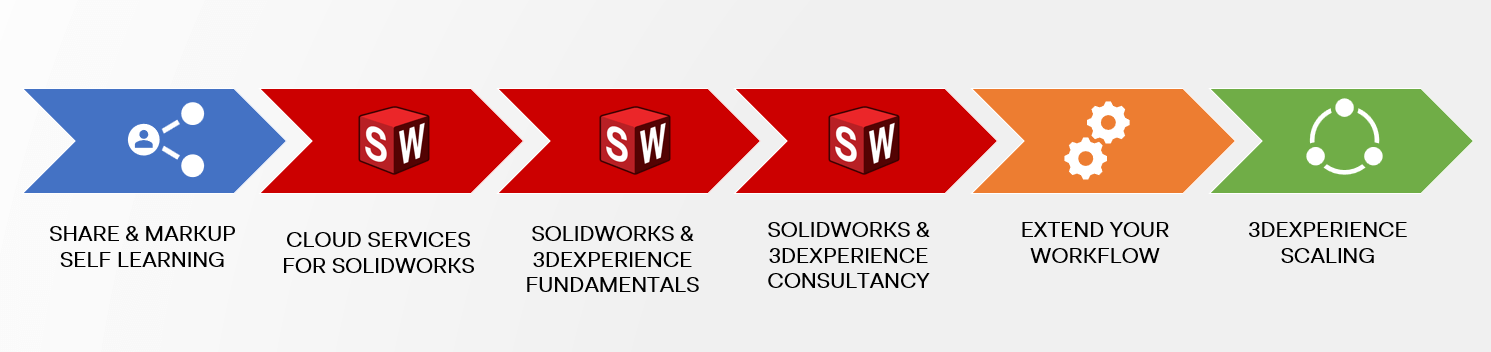
Share and Markup – Self Learning
- Store and share files with other users, even if they do not have 3DEXPERIENCE. To use this, follow along with our videos at your own pace.
Cloud Services for SOLIDWORKS – FREE* Online Training
- Get a first look at how to store and manage your SOLIDWORKS data in 3DEXPEREINCE by attending one of our regular online training sessions. The half day courses are instructor show and tell sessions, designed to help you learn the basics of Cloud Services.
Formal, Guided Training Course – SOLIDWORKS & 3DEXPERIENCE Fundamentals
- Attend our standard 3DEXPERIENCE & SOLIDWORKS training courses to learn everything you need to know about storing and managing your SOLIDWORKS data in the 3DEXPERIENCE platform. These training courses are instructor led with guided practice and exercises.
Assisted Implementation Service – SOLIDWORKS & 3DEXPERIENCE Consultancy
- Our most comprehensive offering with setup and training included. We will tailor your 3DEXPERIENCE to best suit your SOLIDWORKS workflow. Then train your users on the live system. A variety of consultancy packages are available to suit your specific needs.
SOLIDWORKS & 3DEXPERIENCE Extend the Workflow: Manage & Control – Additional Extra
- Additional user training for users who wish to use a more complex workflow, including formal changes and approval processes.
3DEXPERIENCE Scaling – The Next Steps
- The next stage of your journey with 3DEXPERIENCE. Utilise more roles from Cloud CAD to Simulation and Manufacturing.
We will tailor Cloud Services for SOLIDWORKS implementations to suit your workflow as it is now, or at any time in the future. How you take advantage of Cloud Services, is up to you.
If you’d like to find out more, get in touch with us today.
 |
About the author: This guide was written by 3DEXPERIENCE Product Manager, Lucy Bryan. Lucy is an Elite SOLIDWORKS Applications Engineer and has been with the Visiativ Technical Support Team since 2019. |
|||
|
|
||||