

How PLM Can Help Manage Your Bills of Materials
12 August 2025
by Simon Dass, Visiativ Products Manager.
In a previous article I gave a broad overview of the Product Lifecycle Management (PLM) process. Specifically, how PLM can be used to create and manage Bills of Materials (BOMs) starting in the early part of the product lifecycle through to manufacturing.
What is a Bill of Materials (BOM)?
A BOM or Product Structure is a list of components that defines the product composition. It would list component attributes such as Part Number, Name/Description, Revision and importantly, Quantity. A BOM could have many more attributes to help define the product. Ultimately, a BOM is ordered and structured.
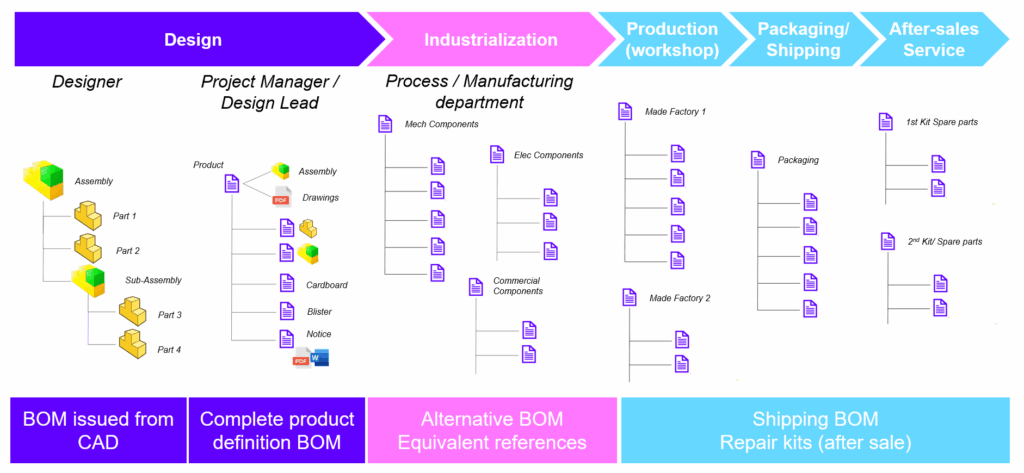
The BOM would show logical grouping of components such as sub-assemblies. And depending on where it is defined or consumed, the structure and groupings may change for the same product depending on who is viewing it. For example, Engineering may structure the BOM based on how the product would function, but Production may need to structure it based on how the product is manufactured and assembled.
Who defines BOMs?
As mentioned above, multiple departments will play a part in defining a product’s BOM. Early in the product lifecycle, the BOM would be defined during Conceptualisation by Product Management.
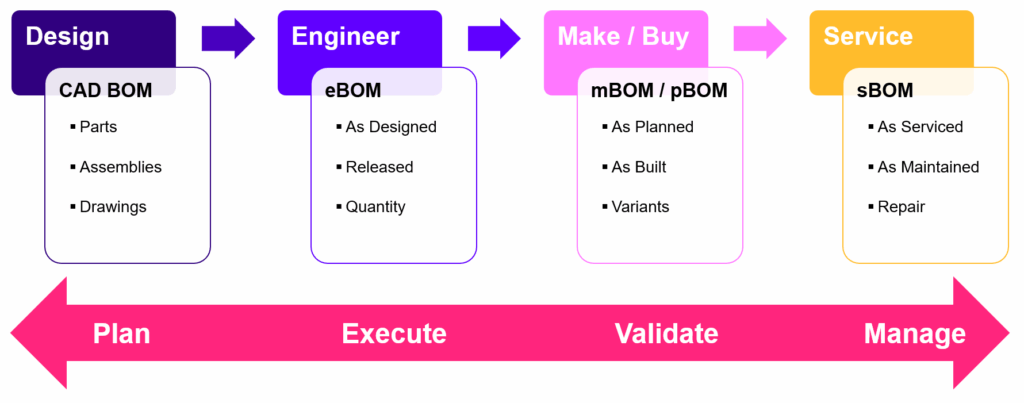
During the Design & Engineering phase, the product’s mechanical design would be done in 3D CAD systems like SOLIDWORKS, where the 3D CAD assembly structure, or CAD BOM, would form a key element of the full product structure.
Later, the CAD BOM would be used to define the Engineering BOM (eBOM). The eBOM created in Design/Engineering would represent the full Product Structure containing all the product items that make up the product:
- Mechanical
- Electrical
- Software (e.g., firmware)
- Chemical (e.g., lubricants, adhesives, etc.)
Once the eBOM is defined, additional BOM types may need to be derived from it. For example:
- Manufacturing BOM (mBOM) – Production department would need to restructure the eBOM to suit the manufacture and assembly process and add extra items such as tooling and fixtures
- Purchasing BOM (pBOM) – Purchasing or Supply Chain departments would need to group items based on Make or Buy criteria and total quantities to aid the procurement process
- Service BOM (sBOM) – Service department may need a view of the product structure that only lists items that are required for spare parts, repair or maintenance
Visiativ France have additional examples of BOM types and the respective functions on their website, take a look here.
Solutions in PLM to manage Bills of Materials
1. BOM Creation
Many businesses manage Bills of Materials of their full Product Structures by manually creating line items in spreadsheets. The reasons given are that, usually, an eBOM needs to contain other items that are not just Mechanical components (based on the 3D CAD assembly structure), plus the eBOM needs to be modified by non-Designers, and the eBOM needs to be controlled separately from the CAD data.
The manual creation of eBOMs using spreadsheets can be slow and prone to data entry errors. This is especially true when the data is coming from various sources. The eBOM spreadsheet could be immediately out of date due to rapid product development or engineering changes. This then requires the eBOM to be regularly and manually updated.
PLM systems, like Visiativ PLM or 3DExperience, can help increase efficiency with the creation and management of BOMs by:
- Providing a centralised environment for product stakeholders who need to create and View BOMs
- Providing tools that automate the creation of eBOMs from CAD BOMs structures
- Allowing you to visualise the relationship between eBOM items and their defining CAD documents
2. Different component types
As mentioned earlier, eBOMs could be a collection of different component types (Mechanical, Electrical, Chemical, etc.). If you were to use the 3D CAD system to define a full eBOM, you would soon realise its limitations for this task.
For example, CAD is designed to handle files that hold geometry and properties, and you can only use the CAD tool/licence to create structures with CAD files. This limits what kinds of non-Mechanical Items that can be captured in CAD and who can create BOMs in CAD. Creating eBOMs in CAD isn’t the most convenient way to manage them due to the added file management incurred and is another reason spreadsheets start to be used to create eBOMs.
A PLM system, like Visiativ PLM, can help improve the quality of the eBOM definition by:
- Using Items to represent the various types of components (mechanical, electrical, etc.) that define the composition of the eBOM
- Allowing the creation of sub-assemblies with Items without the need for a CAD system
- Providing lifecycle and revision management of Items to control their access and use
3. BOM Synchronisation
As already discussed, other departments may be using the spreadsheet-based eBOM as a basis to develop their own BOMs – mBOM in Production, pBOM in Purchasing/ Supply Chain and the sBOM in the Service department.
Manually creating the BOMs consumes a lot of time, and teams might fail to spot data entry errors and out-of-date data. Any mistakes could result in ordering the wrong parts or incorrectly producing parts using out-of-date part revisions, which consumes both time and money to rectify.
Changes to the eBOM would require the downstream BOMs be updated and synchronised manually to reflect the changes, consuming more time and effort.
A PLM system like Visiativ PLM can help improve collaboration between departments and improve digital continuity for downstream BOMs by:
- Providing automation for the creation downstream xBOM types (mBOM, sBOM, etc.) based on the source eBOM
- Allowing stakeholders to create additional levels or items for their department-specific or process-specific xBOMs
- Keeping downstream xBOM types (mBOM, sBOM, etc.) synchronised to changes in the eBOM
4. BOM Configuration & Effectivity
Another challenging aspect of manual BOM management is controlling the conditions under which a specific component or version of a component is valid or applicable within a product structure. These controlling conditions are known as Effectivity, and it defines when (and under what circumstances) a particular item in the BOM should be used.
One of the most commonly types of Effectivity used is Date Effectivity. This specifies the date range during which a component is valid. For example: A part is effective from 1st January 2025 to 30th June 2025.
A related challenge with BOM components is knowing if they have an equivalent that could be used. For example, if a purchased component in the BOM could be swapped out for an alternative from different suppliers based on where the product will be made. This may rely on another system or database to hold the information meaning it may not be easy to quickly find and swap a component in the eBOM spreadsheet.
A PLM system like Visiativ PLM can help reduce the risk of working to the wrong information and manage Bills of Materials by:
- Using Effectivity to control versions and ensure the right parts are used at the right time
- Using Alternative Items to ensure compliance with using only approved equivalents
How a PLM system can help you manage Bills of Materials
You may have recognised some of what was described above. Your current practices to manage Bills of Materials during the Product Lifecycle Management process may be manual and time-consuming. Visiativ PLM can help you manage BOMs by:
- Centralising BOM creation for Engineering and downstream stakeholders
- Handling different component types needed in eBOMs with Items
- Automating xBOM creation & synchronisation for downstream stakeholders
- Controlling BOM configurations with Effectivity and Alternatives
Visiativ have decades of industry knowledge around Product Lifecycle Management and its various sub-processes like BOM Management. We can help businesses improve R&D efficiency, compliance and productivity – whether they focus on Product Data Management or broader PLM. With our PLM expertise, we’ll work with you to enhance your Product Lifecycle Management for BOM Management.
If you need help with your PLM process, get in touch with our experts today.
Further Reading:
- What is PLM software? Everything you need to know…
- Product Lifecycle Management: Improve your R&D process efficiency with PLM
- How PLM can help Mechanical Designers
- Boost Efficiency With Electronic Document Management
- Digital Transformation for Engineers: Automating the Configure-to-Order Process
|
|
About the author: This guide was written by Visiativ Products Manager, Simon Dass. Simon has been implementing PDM and PLM systems since 2006. |
|||
|
|
View Simon Dass’ LinkedIn Profile here.
|
|||