How to: Create Derived Outputs on Release using 3DEXPERIENCE
12 June 2025
When working with SOLIDWORKS data, ensuring seamless collaboration and consistent access to the latest design files is crucial – especially at the point of release. In this post, we’ll explore how the 3DEXPERIENCE platform enables the automatic creation of derived outputs from SOLIDWORKS files, helping teams maintain a single source of truth while still supporting the need for external collaboration. Whether you’re sharing data with suppliers or clients, using formats like PDF, STEP, or DXF can simplify communication without compromising control. Let’s take a closer look at how to create derived outputs of SOLIDWORKS files on release to streamline your workflow…
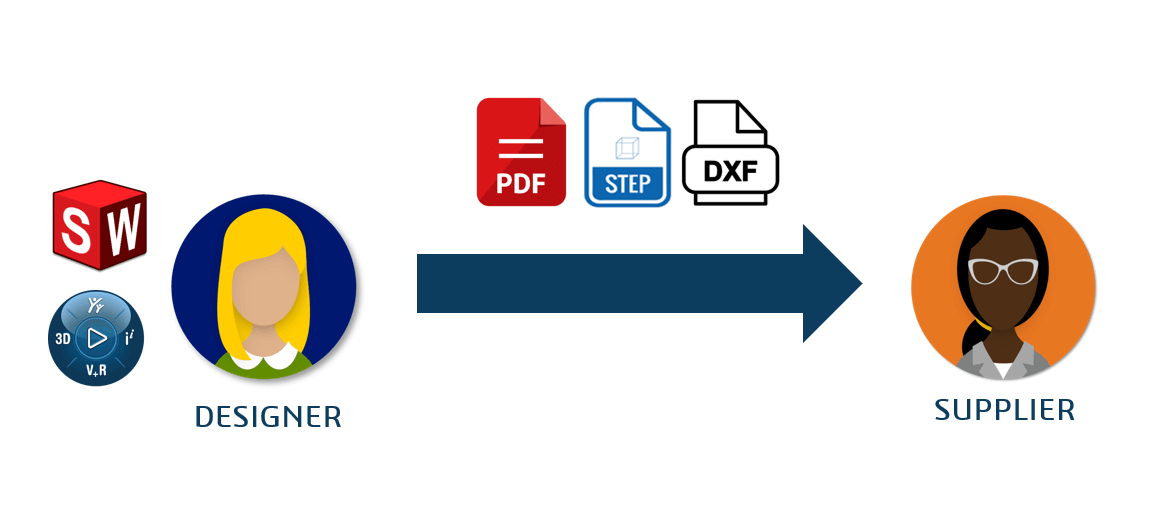
External collaboration between suppliers or customers is common. But how does this work from an engineering perspective? External users may not have roles to access your vault or infrastructure to connect in their location. For this reason, among others, teams often use neutral files to collaborate externally. They’ll typically convert SOLIDWORKS data to formats like PDF, DWG, DXF, and STEP.
What is a Derived Output?
A derived output file is a secondary database object that 3DEXPERIENCE generates from SOLIDWORKS CAD data. The object sits in the Collaborative Space with the original file. You cannot edit derived outputs manually – when the source CAD data updates, you must update the outputs accordingly. For example, you can generate STEP files from 3D CAD data or create PDFs from 2D drawings. Usually, these file types are neutral file types meaning they do not require a specific software to open. Giving more flexibility to those who want to send and receive them.
Derived Format Management
In 3DEXPERIENCE, you can automate derived output creation when saving from SOLIDWORKS or changing a maturity state. Administrators manage these conversion rules in the Derived Format Management console within Platform Manager.
Derived Outputs – How Does it Work?
The video below shows an example of the workflow process that generates the derived outputs on the change in maturity for an assembly. This includes displaying the conversion rules in Derived Format Management.
Once the derived output has been created and stored in the system, there are many ways to download it. Platform members with Collaborative Industry Innovator licenses and the correct collaborative space responsibility can download derived outputs from the Information panel of a file.
Watch: How to Create Derived Outputs on Release With 3DEXPERIENCE
Visiativ customers requiring assistance 3DEXPERIENCE Cloud Data Management and derived formats can contact our Support Team for guidance.