Automate your SOLIDWORKS designs with a free DriveWorks Solo trial
18 February 2026
If your design team spends ages recreating “same but different” SOLIDWORKS designs, you’re not alone! Many engineering departments still rely on manual revisions to produce order-specific parts, assemblies, and drawings. That’s often where delays, mistakes, and rework start to creep in.
The solution? A 30-day free trial of DriveWorks Solo is a practical way to begin automating your SOLIDWORKS design work. It can help you reduce repetitive modelling, speed up design cycles, improve accuracy, and free up engineering time for higher-value work.
Start automating with DriveWorks Solo
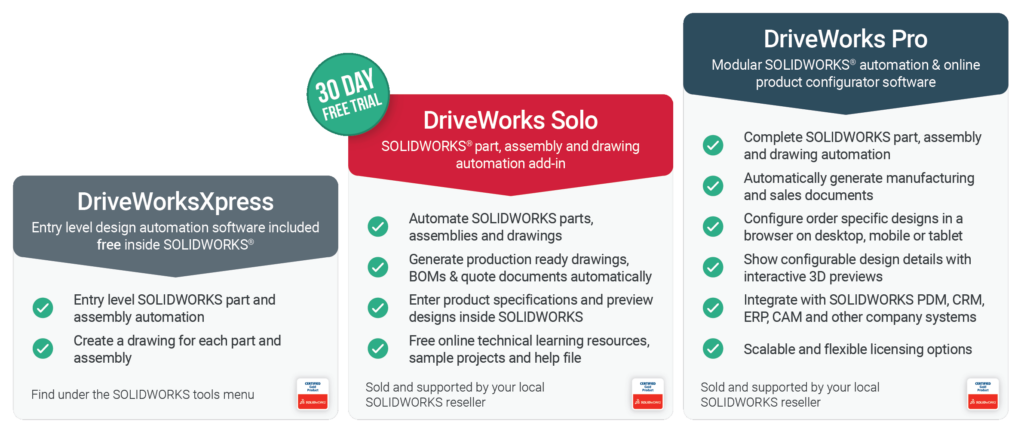
DriveWorks Solo enables you to automatically generate order-specific SOLIDWORKS parts, assemblies, and drawings using a rules-based approach, all within SOLIDWORKS.
Instead of manually editing models, drawings, and related files for every customer variation, your engineers can set the logic once and let DriveWorks generate the outputs for each new order.
What is DriveWorks Solo?
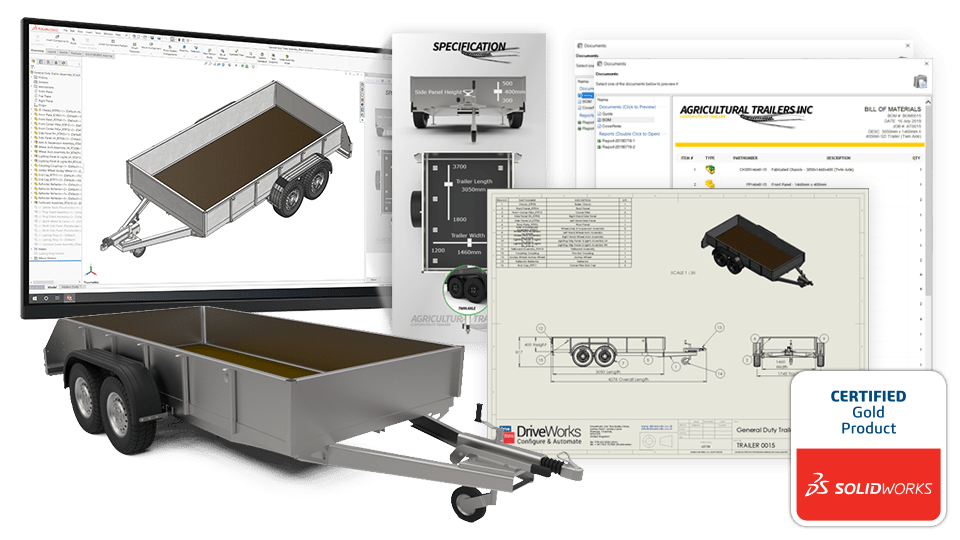
An authorised ‘Certified Gold Product’, DriveWorks Solo is a powerful design automation tool that works directly inside the SOLIDWORKS task pane. It allows design engineers to configure products and generate new CAD outputs without leaving their existing workflow.
At its core, DriveWorks Solo uses rules-based logic driven by your engineering knowledge. This enables you to capture the design intent behind your products, including the variables that change from order to order, such as:
- Dimensions (length, width, height)
- Material selection
- Feature inclusion or exclusion
- Product options and configurations
Once those rules are set, DriveWorks Solo can automatically create new design variations in minutes, without the need to rebuild the model manually each time.
DriveWorks Solo is used across a wide range of industries, including:
- HVAC
- Transportation
- Materials handling
- Architectural components
- Furniture
Don’t just take our word for it…
Visiativ UK & Ireland customer, Wozair, specialise in the design, manufacture, and installation of heavy-duty heating, ventilating, and air conditioning (HVAC) products.
Since implementation of DriveWorks, Wozair have automated their SOLIDWORKS design process, reduced the risk of human errors, and are able to get information from their design team to manufacturing faster than ever before.
Watch this video to find out how DriveWorks has given the Wozair team a “fresh start”:
Why choose DriveWorks Solo?
DriveWorks has been helping engineering teams automate SOLIDWORKS 3D CAD since 2001, and DriveWorks Solo is a SOLIDWORKS Certified Gold Product.
For design engineers, DriveWorks Solo delivers three key benefits:
1: Faster designs
DriveWorks Solo helps engineering teams accelerate design output by automating repetitive revision tasks.
Instead of engineers spending hours updating dimensions, features, drawings, and related files, DriveWorks can generate those updates automatically using your predefined rules.
This does not just shorten lead times. It also allows engineers to focus more of their time on work that genuinely requires engineering skill, such as product improvement and new development.
2: Fewer errors
Manual design updates are one of the most common sources of mistakes in CAD workflows, especially when engineers are working under pressure or producing multiple variations of the same product.
Because DriveWorks Solo creates revisions based on consistent, rules-driven logic, the risk of human error is reduced. That improved accuracy often leads to:
- Less rework and scrap
- Faster turnaround
- Higher customer satisfaction
3: Design compliance
Compliance matters, whether it is internal design standards, safety requirements, or meeting regional and international regulations.
DriveWorks Solo supports compliance by ensuring every output follows the standard rules and parameters your team has set. This means compliance requirements are not dependent on someone remembering to apply them manually. Instead, they are built into the process.
Watch the DriveWorks Solo product overview video:
Maximise your free DriveWorks Solo trial
A 30-day DriveWorks Solo trial gives you enough time to properly test the software with real-world examples, explore the features, and understand what automation could look like in your environment.
During your trial, you will also get access to DriveWorks Solo learning and training resources, so you are not left trying to figure everything out on your own.
Here are seven practical tips to help you get the most value from your trial:
1. Set realistic goals
2. Watch the Getting Started webinar
3. Meet with a DriveWorks technical expert
4. Document your findings
5. Involve other team members
6. Calculate a return on investment based on automating one of your own products
7. Explore the DriveWorks Solo learning and training resources
—
Get direct access to the people who know DriveWorks best
One of the most valuable parts of the DriveWorks Solo trial is the opportunity to speak directly with a DriveWorks technical expert.
These specialists can help you:
- Define achievable goals for the 30 days
- Stay on track with check-in calls
- Identify the best ways to apply automation to your products
- Get answers to technical questions quickly
Get started with a 30-day free trial of DriveWorks Solo
A free 30-day trial gives you:
- Instant access to a full feature trial
- Access to learning and training resources
- The chance to discuss your implementation with a DriveWorks technical expert
- Total flexibility and zero commitment. You don’t even need to provide credit card details to begin!
What are you waiting for? Start 30-day free trial and start automating SOLIDWORKS today!
Want to know more?
Call our DriveWorks experts on 01223 200690 (UK) / +353 56771 9960 (Ireland) and we’ll be happy to organise a demonstration and answer any questions.